Concepts
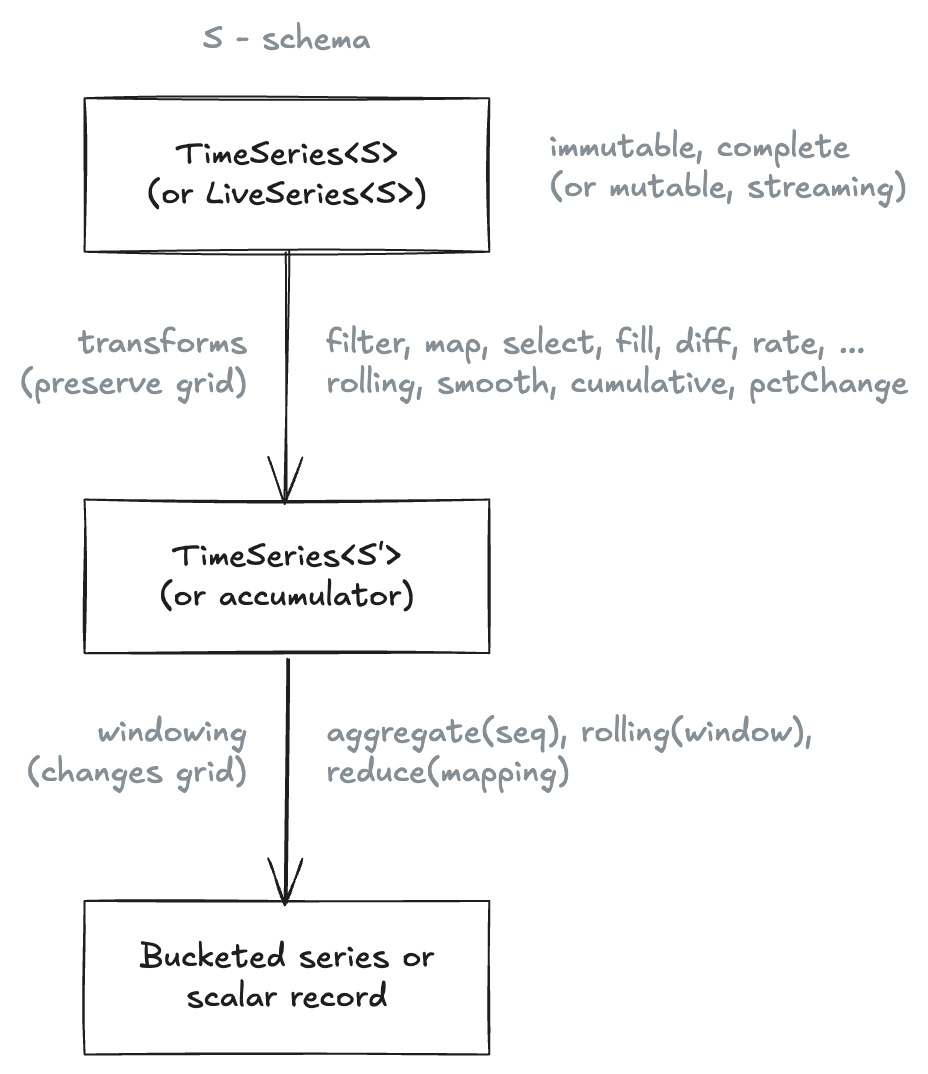
pond-ts is a batch-first, in-memory TypeScript time series library. Batch transforms over schema-typed events; a lenient live-side for streaming- shaped ingest. Not a database, not a query engine, not a full streaming system — see What pond-ts isn't for the detailed scope.
Four primitives carry the whole API:
Event— one temporal key plus a typed payload.TimeSeries— an ordered, immutable collection of events sharing a schema.- Temporal keys —
Time,TimeRange,Interval. Sequence— a grid definition that turns a time axis into bucketed spans.
Everything else — aggregate, rolling, smooth, reduce, the whole
LiveSeries side — operates on these. Read this page top-to-bottom
once; then the transform pages assume the vocabulary.
pandas's .resample() covers both directions; pond-ts splits them:
- Downsample (fewer rows out than in) —
aggregate(seq, mapping)≈.resample().agg() - Upsample / regrid (one row per grid point, hold or interpolate)
—
align(seq, { method })≈.asfreq()+.ffill()/.interpolate('time') rolling(window, mapping)≈.rolling().agg()within(range)/overlapping/trim≈.loc[]slicing with three explicit semanticsreduce(mapping)≈.agg()on the whole framegroupBy(col)≈.groupby(col)
See Sampling overview for the
treatment of the split, and Aggregation
for the deep dive on aggregate.
Full translation table coming in the Reference section; for now, transform pages cross-reference the analogue inline.
| pondjs | pond-ts |
|---|---|
TimeSeries (sorted) | TimeSeries (conceptually 1:1; methods differ — everything below is in the new API) |
Collection (unordered) | TimeSeries — pond-ts only exposes the sorted variant |
IndexedEvent | Event<Interval> |
TimeRangeEvent | Event<TimeRange> |
Pipeline + processors | method chain on TimeSeries |
Pond / Aggregator | batch aggregate() or LiveAggregation |
pond-ts deliberately drops the Collection / TimeSeries distinction.
pondjs used Collection as the unordered base type and also as the
bucket output of aggregation, which let you apply Collection-ops to
buckets recursively. pond-ts collapses this: a bucket is a smaller
TimeSeries, so anything that works on the whole series works on a
bucket — same API, no second primitive to learn.
Full migration guide is stubbed under Reference; for the common cases the rename table above covers ~80% of what you'll search for.
Mental model
Think of a TimeSeries as a spreadsheet with one special column:

Rows are events, columns are typed, and the first column is always a temporal key. The schema drives construction, type inference across every transform, and aggregation mappings.
The rest of the library is operations you do to that spreadsheet: filter rows, add columns, roll up buckets, smooth a column, aggregate over sequences, reduce the whole thing to scalars.
Event
An Event is:
- one temporal key (a
Time,TimeRange, orInterval) - one typed payload — a plain object keyed by column name
Events are immutable. Methods like set, merge, select, and
rename return new events.
import { Event, Time } from 'pond-ts';
const e = new Event(new Time(Date.parse('2025-01-01T00:00:00Z')), {
cpu: 0.31,
host: 'api-1',
});
e.get('cpu'); // 0.31 — type: number (narrowed from schema)
e.begin(); // 1735689600000 — milliseconds since epoch
You rarely construct individual Events directly in application code;
usually you build a TimeSeries from rows and the library wraps each
row as an Event. Transforms work at the Event level too — filter,
map, diff, rate, trim, align, and per-event views in
LiveView all operate on individual events, either inspecting them
(filter, groupBy) or producing new ones (map, trim, set,
merge). Understanding Event pays off once you're inside one of
those callbacks.
TimeSeries
A TimeSeries<S> is an ordered, immutable collection of events that
share the schema S. S is a readonly tuple of column definitions:
import { TimeSeries } from 'pond-ts';
const schema = [
{ name: 'time', kind: 'time' },
{ name: 'cpu', kind: 'number' },
{ name: 'host', kind: 'string' },
] as const;
const cpu = new TimeSeries({
name: 'cpu',
schema,
rows: [
[Date.parse('2025-01-01T00:00:00Z'), 0.31, 'api-1'],
[Date.parse('2025-01-01T00:01:00Z'), 0.44, 'api-1'],
[Date.parse('2025-01-01T00:02:00Z'), 0.52, 'api-1'],
],
});
cpu.length; // 3
cpu.at(0)!.get('cpu'); // 0.31 — narrows to number
cpu.at(0)!.get('host'); // 'api-1' — narrows to string
as const is load-bearingWithout as const, TypeScript widens the schema tuple to
{ name: string; kind: string }[] and you lose per-column narrowing on
.get(). If cpu.at(0)!.get('cpu') ever shows as
ColumnValue | undefined instead of number | undefined, check here
first.
Schemas drive everything
A transform's output schema is derived from its input schema, so
.get() stays narrow:
const smoothed = cpu.smooth('cpu', 'ema', {
alpha: 0.35,
output: 'cpuTrend',
});
// smoothed.schema gains a cpuTrend number column:
// [{ time, time }, { cpu, number }, { host, string }, { cpuTrend, number }]
smoothed.at(0)?.get('cpuTrend'); // number | undefined
Aggregations, reductions, rolling windows, smoothings — each narrows its output type based on reducer / operator kind. See Transforms for the details.
Column kinds
pond-ts supports four value kinds for cells:
| Kind | Runtime type | Example |
|---|---|---|
'number' | number | 0.31 |
'string' | string | 'api-1' |
'boolean' | boolean | true |
'array' | ReadonlyArray<scalar> | ['a', 'b'] |
Array columns are inert for numerical operators (diff, rate,
rolling over numbers) — they pass through untouched. See
Array columns for details and the
reducers that produce them.
Temporal keys
Every event has exactly one temporal key. Which one is a modeling choice — it encodes how the event sits on the timeline.

Time
An instant. Use this for point-in-time measurements: one request latency, one CPU sample, one stock tick.
import { Time } from 'pond-ts';
new Time(1735689600000); // ms since epoch
new Time(new Date('2025-01-01T00:00:00Z'));
new Time(Date.parse('2025-01-01T00:00:00Z'));
Time takes number | Date. When starting from an ISO string, use
Date.parse(...) or new Date(...) explicitly — the library doesn't
guess at string formats.
TimeRange
An unlabeled extent between two timestamps. Use this when the event covers a span — a session, a request duration, an outage window — but doesn't need a bucket identity.
import { TimeRange } from 'pond-ts';
new TimeRange({
start: Date.parse('2025-01-01T00:02:00Z'),
end: Date.parse('2025-01-01T00:04:00Z'),
});
Interval
A labeled extent. Produced by Sequence bucketing and aligned
aggregations. The label — the index — lets an aligned series round-
trip through JSON and keeps bucket identity stable across transforms.
You rarely construct Intervals directly; aggregate(seq, mapping)
and align(seq, ...) produce them.
Sequence
A Sequence defines a grid over the time axis. You pass it to
aggregate or align to bucket or resample events onto fixed spans.
import { Sequence } from 'pond-ts';
const minutely = Sequence.every('1m');
const calendarDaily = Sequence.calendar('day', {
timeZone: 'America/New_York',
});
![Time-keyed cpu events bucketed by Sequence.every('5m'); aggregate produces one Interval-keyed event per bucket. Buckets are half-open start, end), so an event at exactly the boundary lands in the later bucket
const buckets = cpu.aggregate(minutely, {
cpu: 'avg',
host: 'last',
});
// buckets.at(0)?.key() is an Interval, not a Time
// buckets.at(0)?.get('cpu') is number | undefined
Sequence.every(duration) is fixed-step (millisecond-exact);
Sequence.calendar('day' | 'week' | 'month', { timeZone }) steps by
local calendar boundaries and is what you want when month or day
lengths matter. See
Aggregation for worked examples.
BoundedSequence
An explicit finite list of intervals. Use it when the buckets aren't regular — business quarters, predefined report ranges, or boundaries known from outside the data.
import { BoundedSequence, Interval } from 'pond-ts';
const parse = Date.parse;
const quarters = new BoundedSequence([
new Interval({
value: 'Q1',
start: parse('2025-01-01'),
end: parse('2025-04-01'),
}),
new Interval({
value: 'Q2',
start: parse('2025-04-01'),
end: parse('2025-07-01'),
}),
new Interval({
value: 'Q3',
start: parse('2025-07-01'),
end: parse('2025-10-01'),
}),
new Interval({
value: 'Q4',
start: parse('2025-10-01'),
end: parse('2026-01-01'),
}),
]);
aggregate and align both accept Sequence | BoundedSequence.
Selection vocabulary
Three temporal-selection methods with deliberately distinct semantics — if you pick the wrong one the result is quiet data corruption, so the names are chosen to force a choice.
const range = new TimeRange({
start: Date.parse('2025-01-01T00:02:00Z'),
end: Date.parse('2025-01-01T00:05:00Z'),
});
cpu.within(range); // keep events fully contained
cpu.overlapping(range); // keep events that intersect
cpu.trim(range); // intersect and clip key extents

withinpreserves event keys exactly; events are kept or dropped wholesale.overlappingpreserves event keys exactly; straddling events are included in full.trimclips straddling events' key extents to the query range, creating new events with new keys. Values on a clipped event are currently passed through unchanged — there's no proportional- contribution option yet (e.g. weight a half-clipped interval's value byclippedDuration / originalDuration). Under consideration as a future option ontrim.
If you're composing a chart visible-range filter, you usually want
trim so the rendered data doesn't leak outside the axis. If you're
running analytics over a closed window, you usually want within.
Multi-entity series and the cross-partition hazard
A common shape: events for many entities — hosts, regions, devices,
sensors — interleaved in one TimeSeries by time. The first column
is time, then a categorical column like host distinguishes
producers, then the metrics (cpu, requests, …):
time | cpu | host
0 | 0.5 | api-1
0 | 0.7 | api-2
60_000 | 0.6 | api-1
60_000 | 0.8 | api-2
...
This is fine for static analysis (series.length, select('cpu'),
filtering by host), but it's a footgun for stateful transforms.
fill, rolling, smooth, align, diff, rate, pctChange,
cumulative, shift, aggregate, and reduce all read neighboring
events when computing each output. On a multi-entity series, those
neighbors silently cross entity boundaries:
series.fill({ cpu: 'linear' })would interpolateapi-1's missing cell usingapi-2's value as a "neighbor."series.rolling('5m', { cpu: 'avg' })would average all hosts in the window — likely not what you wanted.series.diff('cpu')would diffapi-1's cpu againstapi-2's preceding cpu.
The fix is partitionBy:
series.partitionBy('host').fill({ cpu: 'linear' }).collect(); // per-host fill
series
.partitionBy('host')
.fill({ cpu: 'linear' })
.rolling('5m', { cpu: 'avg' }) // chained per-host ops
.collect();
partitionBy(col) returns a PartitionedTimeSeries view that
scopes stateful transforms to within each entity's events. The view
is persistent across chains — each method returns another
partitioned view, so multi-step per-partition workflows compose
cleanly. .collect() at the end materializes back to a regular
TimeSeries. Composite partitioning works via array:
partitionBy(['host', 'region']).
The per-event ops (map, filter, select, rename, collapse)
are not affected — they look at one event at a time.
See Reshape → partitionBy for the full reference.
The cross-entity issue isn't unique to batch. LiveRollingAggregation,
LiveAggregation, LiveView.window(), and live
diff/rate/fill/cumulative all carry the same risk. A
live.partitionBy(col) primitive is queued (see PLAN.md "Queued:
live partitioning"); for now, snapshot to a TimeSeries via
useSnapshot (or live.toTimeSeries()) and use batch partitionBy.
Getting data in and out
pond-ts is not a chart library — the actual rendering is yours. But the bridge to every chart library is deliberately short:
toPoints()— every event as a flat row keyed by schema column name:ReadonlyArray<{ ts: number, [col]: T | undefined, ... }>. This is the shape Recharts, Observable Plot, visx, and raw d3 all expect. Single-column case: compose withselectfirst (series.select('cpu').toPoints()).TimeSeries.fromPoints(points, { schema })— the inverse. Takes wide-row points and builds aTimeSeriesagainst any time-keyed schema. Useful for round-tripping chart points back into pond-native operations (e.g. bucketing a flat anomaly list viaaggregate).toJSON()/TimeSeries.fromJSON(json)— full-fidelity serialization; schema, name, and all rows round-trip. Use this for persistence or wire transfer.
See Array columns and Ingest for the full shape of these bridges.
What pond-ts isn't
Honest scope is more useful than breathless value prop. pond-ts is:
- Not a database. It holds data in memory; durable storage is outside the library. Round-trip to JSON for persistence or wire transfer.
- Not a query engine. No planner, no optimizer, no cost estimation. Methods compose in the order you write them.
- Not a full streaming system.
LiveSeriestolerates moderate reorder via grace windows at ingest and for bucketed aggregation, but downstream live transforms assume in-order arrival. For the full streaming story (watermarks, triggers, out-of-order correctness through every operator), see Akidau's Streaming 101 / 102. - Not a chart library. See Getting data in and out for the bridge.
Built-in numerical smoothing (EMA, LOESS, moving average, box), temporal joins, rolling windows, calendar-aware sequences, and typed reducers — those are the things pond-ts is trying to do exceptionally well.
Where to go next
- Ingest — JSON serialization, time-zone parsing, missing values
- Queries —
at,first,timeRange,includesKey,intersection, iterators - Eventwise transforms —
map,select,rename,filter,diff,rate,pctChange,cumulative,shift - Cleaning data —
fill, dedupe, ingest edges - Sampling overview — align vs aggregate, mental model + comparison
- Aggregation —
aggregate,reduce,arrayAggregate,LiveAggregation - Reshaping —
groupBy,pivotByGroup,join,joinMany - Rolling windows —
sliding-window reductions,
tail,LiveRollingAggregation - Smoothing — EMA / moving average / LOESS, picking one
- Anomaly detection
—
baseline,outliers - Reducer reference — every built-in
- Charting —
toPointsinterop, Recharts and visx examples - Array columns — when reducers produce collections
- Live series — stream-style ingest